


 Github Stars:
 Last Commit:
  Created:

Overview:
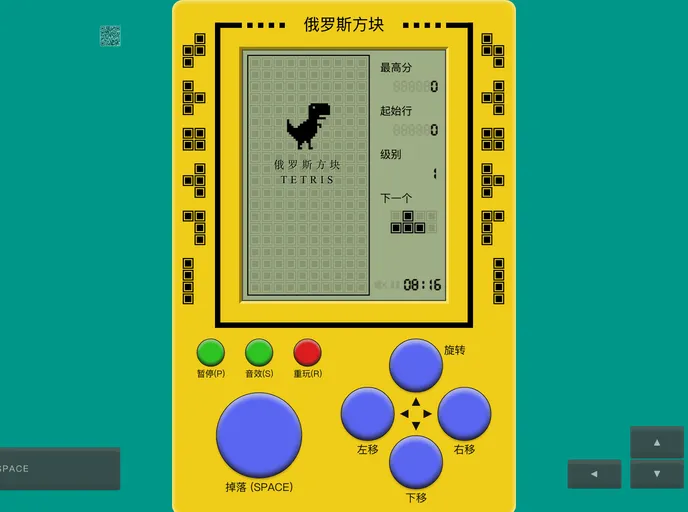
This document discusses a Vue and Vuex implementation of a Tetris game inspired by the React version. The project aims to provide a smooth gaming experience through responsive design and data persistence, utilizing technologies like Web Audio Api for sound effects. The development experience and the process of refactoring a React project into Vue are also highlighted.
Features:
- Responsive Design: Ensures adaptability across different devices, allowing users to play using either a keyboard on a PC or touch gestures on a mobile device.
- Data Persistence: Utilizes Vuex to manage and store game states, ensuring progress is saved even when the webpage is refreshed or the device runs out of battery.
- Web Audio Api Integration: Implements Web Audio Api for precise and high-frequency sound effects during gameplay.
- Event Optimization: Enhances the gaming experience by defining trigger frequencies for movements, delaying horizontal movements upon wall collisions, and simulating mouse events for responsive gameplay.
- Vue Refactoring: Discusses the process of refactoring a React project into Vue, focusing on component logic, state management, and rendering differences between the two frameworks.
Installation:
To install the Vue Tetris game, follow these steps:
- Clone the repository:
git clone [repository_url] - Install dependencies:
npm install - Run the development server:
npm run serve
Summary:
This document outlines the development process of a Tetris game using Vue and Vuex, emphasizing features like responsive design, data persistence, Web Audio Api integration, and event optimization. Additionally, it discusses the challenges and solutions encountered when refactoring a React project into Vue, highlighting differences in component logic, state management, and rendering techniques between the two frameworks.

















