


 Github Stars:
 Last Commit:
  Created:
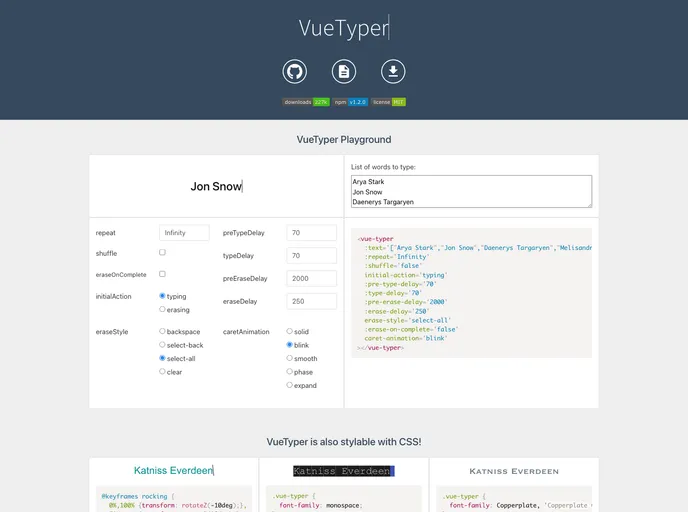
Overview
VueTyper is a powerful tool designed for Vue applications that allows developers to easily create typing animations for text. With a lightweight framework and minimal dependencies, VueTyper is built to enhance user interfaces by adding engaging and dynamic text effects. Perfect for web developers keen to create an interactive experience, this package is streamlined yet effective, making it an excellent addition to any Vue project.
The plugin works seamlessly within the Vue application context, relying solely on Vue’s API methods. This means that users can integrate VueTyper without needing to incorporate additional libraries, keeping their projects neat and efficient. Whether you’re aiming to display catchy introductory texts, dynamic messages, or just want to add a bit of flair to your application, VueTyper is an ideal choice.
Features
Lightweight Dependency: VueTyper requires only lodash.split to handle emojis and Unicode characters, ensuring that your application remains fast and efficient.
Vue Compatibility: Specifically designed for Vue v2.x, it allows smooth integration within Vue applications while avoiding unnecessary overhead.
Flexible Installation: You can easily import VueTyper as a module using npm or access it globally via CDN, giving you options based on your project setup.
Local or Global Registration: Choose to register VueTyper locally within individual components or globally for use across your entire application, providing flexibility based on your project’s needs.
Customizable Props: Users can adjust properties like
text,repeat, andshuffleto tailor the typing effect according to their design preferences.Dynamic Typography: The ability to dynamically change text and other props, though it resets the typing animation, allows for fluid content changes on the go.
Shuffle Feature: Randomizes the text output while maintaining the same frequency of occurrences, giving a fresh feel to repeated typings.
Animation Control: Detailed control over typing speeds and styles enhances customization, letting developers create unique user experiences easily.

















