


 Github Stars:
 Last Commit:
  Created: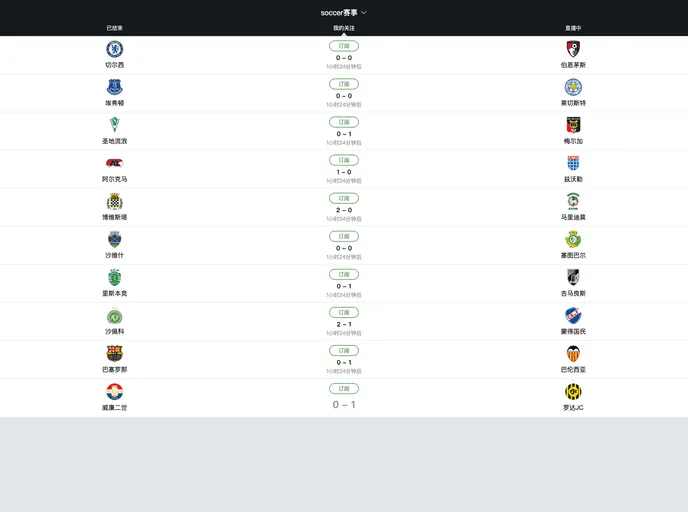
Overview
Cube-UI is an elegant mobile component library built on Vue.js, designed for rapid and seamless mobile application development. This framework emphasizes creating a superb interactive experience with responsive designs and smooth animations. It categorizes its offerings into three main component modules: basic components, overlay components, and scrolling components, covering a comprehensive range of mobile needs. In this exploration, we will delve into its capabilities by creating an app to browse sporting events, focusing on features like navigation, event listings, and modal pop-ups.
Getting started with Cube-UI is a straightforward process. The library provides a convenient scaffolding tool that allows developers to quickly initialize a Cube-UI project with essential configurations and foundational code. This helps kickstart the development journey efficiently, enabling you to focus on crafting your application right from the get-go.
Features
Lightweight Mobile Components: Cube-UI is optimized for mobile use, ensuring fast loading times and smooth interactions, making it ideal for mobile applications.
Intuitive Navigation System: Implement a smooth top navigation bar that allows users to easily switch between different states of sporting events through tabs.
Enhanced User Experience with Slides: Utilize the Slide component for a fluid carousel experience, allowing users to swipe through various tabs seamlessly.
Dynamic Event Listings: The MatchList component can showcase a list of events, crafted with customizable data rendering for rich user engagement.
Seamless Scrolling Features: The Scroll component delivers a superior browsing experience, equipped with options for vertical scrolling, and customizable scroll bar visibility.
Refresh Capabilities: Incorporate pull-down refresh functionality, enabling users to get the latest event updates instantly, enhancing live interaction with the app.
Load More Functionality: Facilitate easy access to more events by adding an up-load feature, allowing users to load additional data as needed without cluttering initial views.
Modal Feedback System: Use the Popup component to create visually appealing modals that notify users when they subscribe to events, improving user engagement and feedback.

















