


 Github Stars:
 Last Commit:
  Created:
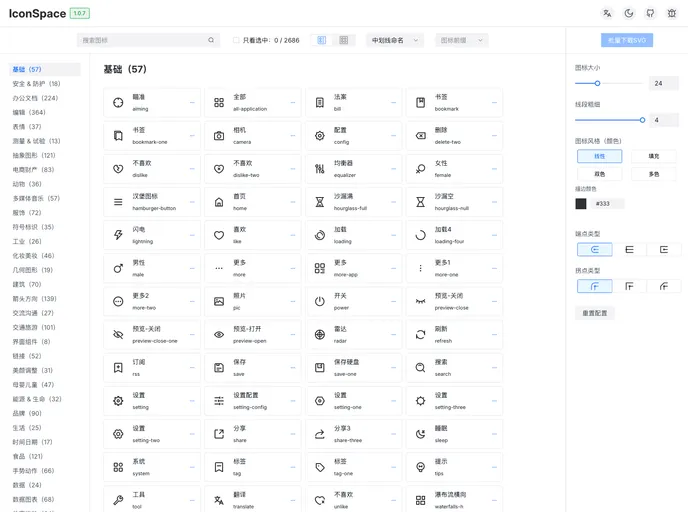
Overview:
IconSpace is a project that builds upon the iconpark library, expanding and transforming it to provide a wide range of cross-platform components. It offers packages for React, Vue2, Vue3, and Pure SVG Icons, making it easy to import and use icon components in your project.
Features:
React Icons: A collection of React components for displaying icons. Github Link NPM Link
Vue2 Icons: Icon components specifically designed for Vue 2.0. Github Link NPM Link
Vue3 Icons: Icon components designed for Vue 3.0. Github Link NPM Link
SVG Icons: A collection of pure SVG icons. Github Link NPM Link
Installation:
To install IconSpace, follow these steps:
- Clone or fork the IconSpace repository.
- Find the corresponding classification in the “source” folder and place your icon file in it.
- Modify the “db.csv” file configuration.
- Submit the changes.
- The project will automatically generate the corresponding React, Vue, Vue-next, and SVG code.
- Modify the versions in the “packages/react/package.json”, “packages/svg/package.json”, “packages/vue/package.json”, and “packages/vue-next/package.json” files.
- Submit the changes and create a new release.
- The Github action will automatically publish the new release.
Summary:
IconSpace is a versatile project that provides a collection of cross-platform icon components. With packages for React, Vue2, Vue3, and SVG icons, it offers an easy way to add icons to your projects. The installation process is straightforward, allowing users to generate the desired icon code automatically.

















