


 Github Stars:
 Last Commit:
  Created:


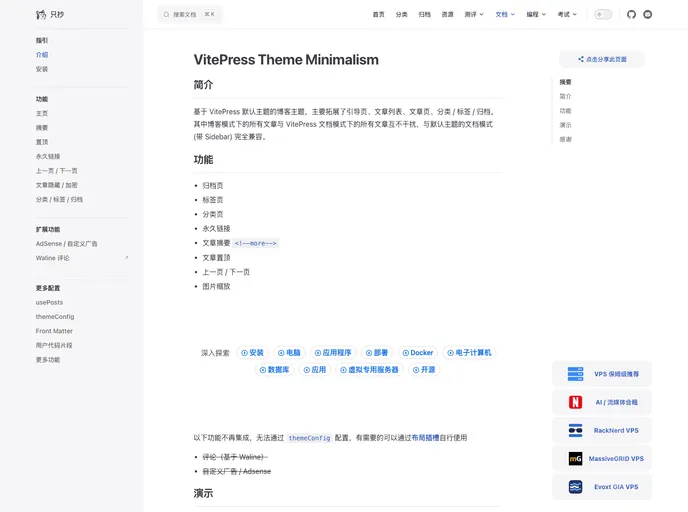
Overview
The minimalist VitePress blog theme is a custom theme that extends the default VitePress theme. It provides a clean and simple design for blog websites. The theme includes various features such as archives, tabs, permalinks, summaries, pins, and zooming images. It is fully compatible with the default theme’s document mode and offers two homepage options - either a posts list or a leading page. The theme is built on top of VuePress and VitePress, making it efficient and easily customizable.
Features
- Archives: Provides a dedicated page to display all the blog posts in an organized manner.
- Tabs: Enables the use of tabbed content within blog posts for better organization and navigation.
- Permalink: Generates unique URLs for each blog post, allowing direct linking and easy sharing.
- **Summary \
**: Allows for the display of a summary or excerpt of the blog post on the posts list page.
- Pin: Allows for pinning important posts to the top of the posts list for better visibility.
- Zoom Images: Enables the ability to zoom in on images by clicking on them.
Comments: Not available in this theme.
Installation
To install the minimalist VitePress blog theme, you can follow these steps:
Clone the theme repository into your VitePress project’s
themesfolder:git clone https://github.com/example/blog-theme.git themes/blog-themeUpdate the
themeoption in yourconfig.jsfile to use the blog theme:module.exports = { // ... theme: 'blog-theme', // ... }Customize the theme by modifying the theme’s configuration file located at
themes/blog-theme/config.js.Add your blog posts in the
docsfolder of your VitePress project.Run the VitePress development server to see the theme in action:
npm run devBuild the VitePress project for production deployment:
npm run buildDeploy the generated
distfolder to your web server or hosting platform.
Summary
The minimalist VitePress blog theme is a stylish and user-friendly theme that enhances the default VitePress experience. It offers a range of features such as archives, tabs, permalinks, and zooming images, providing a seamless and intuitive browsing experience for blog visitors. With its easy installation process and customization options, it is an excellent choice for creating minimal and modern blog websites.

















