


 Github Stars:
 Last Commit:
  Created:


Overview
Vue Carousel is a simple and flexible carousel component for Vue.js 3. It is lightweight, with just 5kB in size. The component allows for easy creation of carousels with various features and customization options.
Features
- Simple and lightweight: Vue Carousel has a small file size of only 5kB, making it easy to integrate into any project without impacting performance.
- Flexible: The component is highly customizable, allowing users to adjust various settings such as autoplay, interval, and indicator position.
- Multiple slide types: Vue Carousel supports different slide types, including default slides, custom indicators, and custom pagination.
Installation
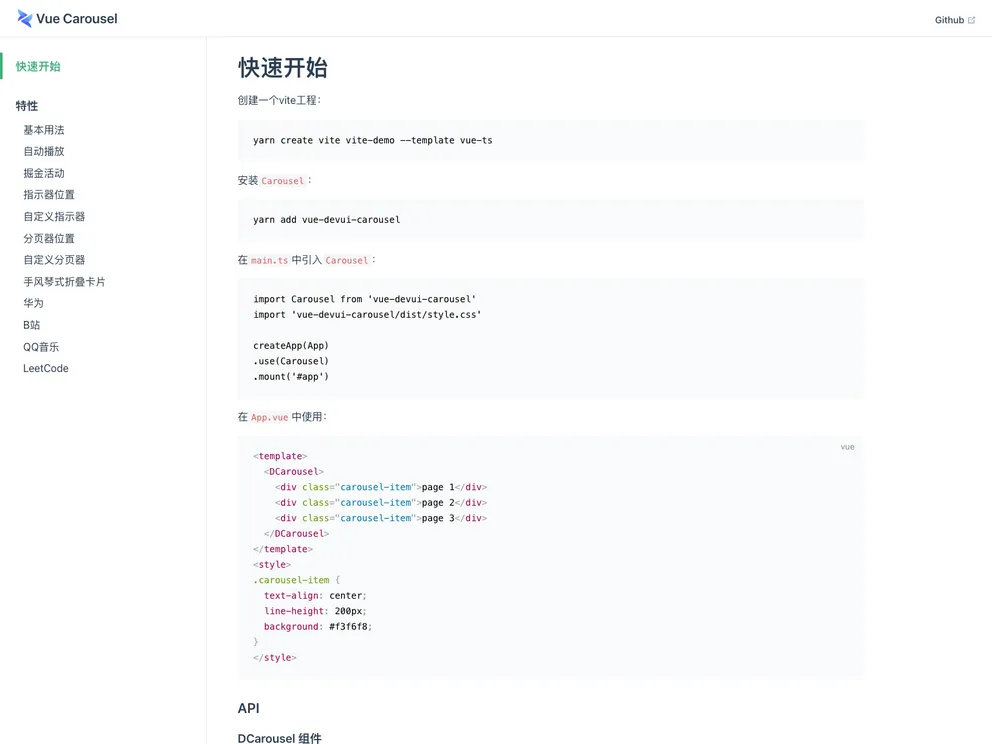
To install Vue Carousel, follow these steps:
- Create a new Vite project.
- Install Vue Carousel using npm or yarn:or
npm install vue-carouselyarn add vue-carousel - Import Vue Carousel in your main.ts file:
import { createApp } from 'vue' import VueCarousel from 'vue-carousel' const app = createApp(App) app.use(VueCarousel) app.mount('#app') - Use Vue Carousel in your App.vue component:
<template>
  <VueCarousel v-model="currentPage">
    <!-- Slide content here -->
  </VueCarousel>
</template>
<script>
  import { ref } from 'vue'

  export default {
    setup() {
      const currentPage = ref(1)
      // Other logic and methods

      return {
        currentPage
      }
    }
  }
</script>
Summary
Vue Carousel is a lightweight and flexible carousel component for Vue.js 3. It offers various features and customization options, allowing users to easily create and customize carousels in their Vue projects. With its simple installation process and small file size, Vue Carousel is a great choice for adding carousel functionality to Vue.js applications.

















