


 Github Stars:
 Last Commit:
  Created: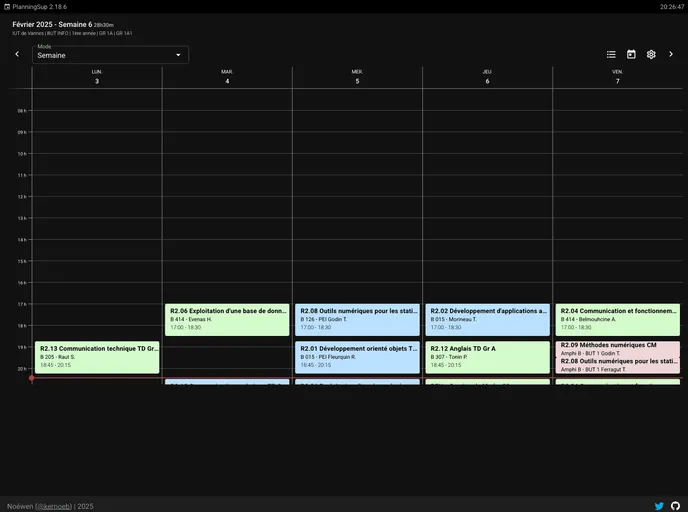
Overview
This document analyzes a planning app developed in Nuxt.js with key features including offline functionality, color customization, different viewing modes, zooming into courses, switching universities/specialties, light/dark themes, multiple schedule selection, automatic schedule refreshing, and course blocking. Installation instructions and development details are also provided.
Features
- Offline mode / PWAC installation: Allows users to access the app offline and install it as a Progressive Web App.
- Color customization: Users can choose colors by category or by different academic activities (e.g., lecture, tutorial, lab).
- Day/week/month view: Provides different viewing modes for easier navigation and planning.
- Zoom on a course: Allows users to zoom in on a specific course for better visibility.
- Switching universities/specialties: Users can easily change the university or specialty through cookies or app settings.
- Light/dark theme: Offers a light or dark theme option based on user preference (controlled by cookies).
- Multiple schedule selection: Users can select multiple schedules to view and manage simultaneously.
- Automatic schedule refreshing: The schedule automatically refreshes upon page load, focus, and every 2 minutes.
- Course blocking: Users can block specific courses from the schedule display.
Installation
To install the planning app, follow these steps:
Create a
.envfile with the following variables:- Replace the
SESSION_SECRETvariable with a random and unique value.
- Replace the
Copy the
docker-compose.ymlfile and run the following command to start the containers:docker-compose pull && docker-compose up -d --remove-orphans
Summary
The planning app provides a range of features to enhance the user experience and improve schedule management. It offers offline functionality, customizable colors, different viewing modes, zooming capabilities, university/specialty switching, light/dark themes, multiple schedule selection, automatic schedule refreshing, and course blocking. The app is developed using Nuxt.js and is dockerized for easy deployment. Users can install it as a Progressive Web App and customize their schedules based on their preferences and needs.

















