


 Github Stars:
 Last Commit:
  Created:


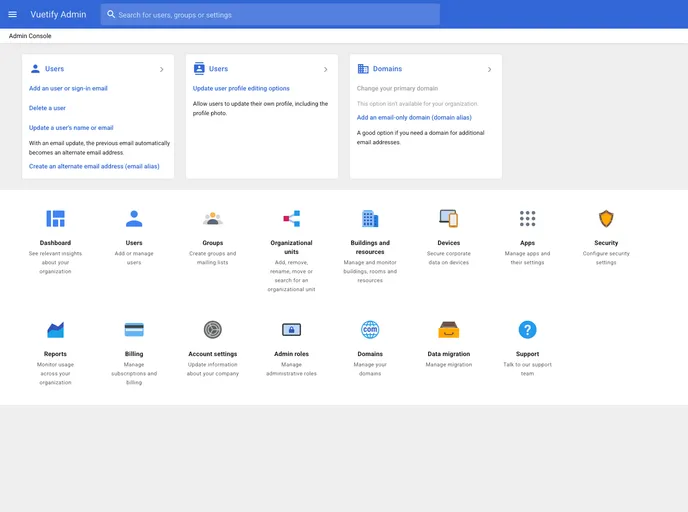
Overview:
The Vuetify Admin Console is a theme designed for Vue.js framework using the Vue Router and Vuetify component library. It offers a sleek and modern design based on Material Design, making it aesthetically pleasing and user-friendly.
Features:
- Home: Provides a homepage for users to get an overview of the application.
- Dashboard: Offers a customizable dashboard with various widgets to display relevant information.
- Action table: Includes a table with actions that users can perform, such as editing or deleting items.
- User creation dialog: Allows users to create new user accounts through a convenient dialog window.
- Settings layout: Provides a dedicated layout for managing and customizing application settings.
- Internationalization: Offers support for multiple languages and allows users to switch between them seamlessly.
Installation:
To install the Vuetify Admin Console theme, you can follow these steps:
- Make sure you have Vue.js framework installed and set up in your project.
- Install the Vue Router and Vuetify component library packages using the package manager of your choice (e.g., npm or yarn).
npm install vue-router vuetify
- Import the necessary packages and components in your main Vue.js file.
import Vue from 'vue'
import VueRouter from 'vue-router'
import Vuetify from 'vuetify'

// Your code and configurations here

Vue.use(VueRouter)
Vue.use(Vuetify)
- Set up the router and Vuetify theme in your Vue.js application.
const router = new VueRouter({
  // Your router configurations here
})

new Vue({
  el: '#app',
  router,
  vuetify: new Vuetify(),
  // Your app configurations here
})
- Finally, you can start using the Vuetify Admin Console theme by including the necessary components in your Vue templates.
Summary:
The Vuetify Admin Console is a visually appealing and feature-rich theme designed specifically for Vue.js applications. With its modern design based on Material Design principles, it provides users with a pleasant user experience. The theme offers various key features such as customizable dashboards, convenient user management, and support for multiple languages. The installation process is straightforward, making it easy to incorporate the theme into your Vue.js project.

















