


 Github Stars:
 Last Commit:
  Created:


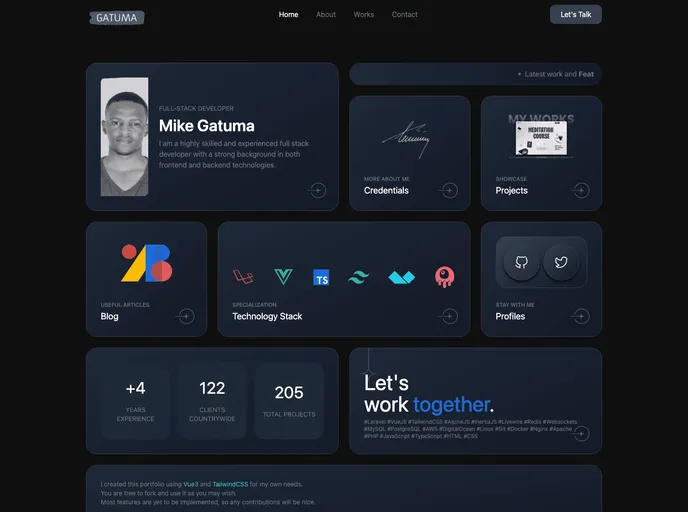
Overview
The Vue Tailwindcss Portfolio Template is a dark-themed portfolio designed specifically for developers. Built with Vue3 and TailwindCSS, this template offers a grid-style layout that showcases projects and skills. It is open for contributions and can be easily forked.
Features
- Grid style layout for portfolio projects
- Dark theme for a sleek and modern look
- Developed with Vue3 and TailwindCSS for ease of use and customization
Installation
To install the Vue Tailwindcss Portfolio Template, follow these steps:
- Install the recommended IDE setup: VSCode + Volar (disable Vetur) + TypeScript Vue Plugin (Volar).
- Enable type support for .vue imports in TypeScript by replacing the tsc CLI with vue-tsc for type checking.
- Install the TypeScript Vue Plugin (Volar) for editors to make the TypeScript language service aware of .vue types.
- If the standalone TypeScript plugin is not fast enough, enable the Take Over Mode in Volar for better performance. This can be done by disabling the built-in TypeScript Extension, finding TypeScript and JavaScript Language Features in the VSCode’s built-in extensions, and disabling it for the workspace.
- Reload the VSCode window by running Developer: Reload Window from the command palette.
Summary
The Vue Tailwindcss Portfolio Template is a modern and stylish portfolio option for developers. With its grid-style layout, dark theme, and compatibility with Vue3 and TailwindCSS, it provides a visually appealing and customizable solution for showcasing projects and skills. The installation process is straightforward, and the template can be easily modified to suit individual preferences.

















