


 Github Stars:
 Last Commit:
  Created:

Overview:
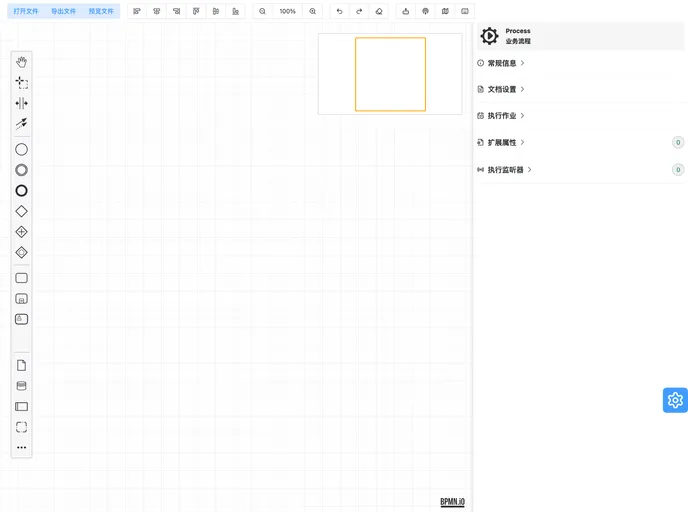
The Flowable流程引擎组件 is a collaborative development project between the “小学生"大佬 and the author in Chengdu. This component, integrating the front-end designer and back-end flow engine of Flowable, boasts redesigned property editing panels for improved user experience. It incorporates features like process validation, progress preview, rich text editor, and code editor, catering to real-world business scenarios and usage. The component allows seamless integration within systems, enhancing usability.
Features:
- Redesigned Property Editing Panel: Optimized for a better user experience.
- Process Validation and Progress Preview: Enhanced functionalities for business scenarios.
- Rich Text Editor and Code Editor: Added tools for flexibility in editing.
- System Embedding Capability: Direct integration within systems for ease of use.
Installation:
To install the Flowable流程引擎组件, follow these steps:
- Clone the repository from the official GitHub page:
git clone https://github.com/flowable/flowable-engine.git
- Navigate to the downloaded folder and install dependencies:
cd flowable-engine
npm install
- Start the back-end engine:
npm start
- Launch the front-end designer:
npm run designer
- You are now ready to use the Flowable流程引擎组件 in your system.
Summary:
The Flowable流程引擎组件 is a well-integrated solution with Flowable’s flow engine, offering a redesigned user experience through optimized property editing and additional features like process validation and progress preview. With rich text and code editors, it caters to diverse business scenarios. The ease of embedding within systems further enhances its usability, making it a comprehensive tool for workflow management.

















