


 Github Stars:
 Last Commit:
  Created:
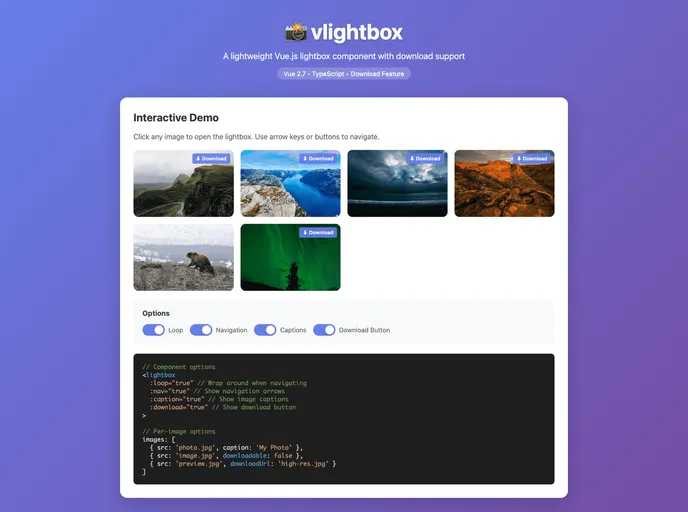
Overview
The vlightbox is a simple yet effective lightbox component designed for native Vue.js applications. Specifically targeting Vue 2.7.x, which is the final release for this version, the component is perfect for users looking to showcase images in a more engaging way. With a clean interface, it allows for easy navigation through a gallery of images, providing not just a visual treat but also enhancing the user experience with its intuitive design.
This component is particularly beneficial for developers who want to bring a touch of sophistication to their projects without overwhelming users. By offering a mix of essential features and user-friendly interactions, vlightbox stands out as a reliable choice for anyone looking to integrate a lightbox into their Vue.js projects.
Features
- Easy Image Management: Supports an array of image objects, allowing for optional captions and download links.
- Current Image Tracking: The
currentImageprop allows for synchronizing the display of images, enhancing the navigation experience. - Overlay Control: Users can toggle the visibility of the lightbox using the
overlayActiveprop, providing flexibility for how images are presented. - Loop Navigation: The
loopfeature lets users cycle back to the first image when reaching the end of the gallery. - Navigation Controls: Built-in controls for next, previous, and close functions help users navigate through images effortlessly.
- Caption Display: Option to show captions for images, allowing for a more informative browsing experience.
- Download Option: Users can enable a download button for images, making it easy to save visuals directly.
- Keyboard Shortcuts: Intuitive keyboard navigation with arrow keys and Escape for easy control over image viewing.
Whether you’re developing a personal project or a professional application, vlightbox offers a streamlined way to enhance visual content interaction.

















